
Trustworthy AI: Bridging the Gap Between UX and QA
How do you design AI that users actually trust? This guide breaks down the essential collaboration between UX and QA, showing teams how to build transparent interfaces, stress test autonomous agents, and master graceful degradation.

How do you design AI that users actually trust? This guide breaks down the essential collaboration between UX and QA, showing teams how to build transparent interfaces, stress test autonomous agents, and master graceful degradation.
The release of strict regulatory frameworks like the 2026 EU AI Act has caused a massive shift in software development. Building AI is no longer just about raw capability. It is entirely about trust.
For an AI system to be considered truly trustworthy, two things must happen simultaneously. The front-end interface must communicate clearly to the user, and the back-end system must operate reliably under stress. This reality forces a critical intersection between two disciplines that traditionally operate in silos: User Experience (UX) Design and Quality Assurance (QA).
Here is how UX and QA must collaborate to build AI systems that users can actually trust.
1. Mapping Agentic AI: UX States vs. QA Failure Modes
We have moved past simple text generators and into the era of "Agentic AI." These are autonomous models that perform complex, multi-step tasks across various applications in the background.
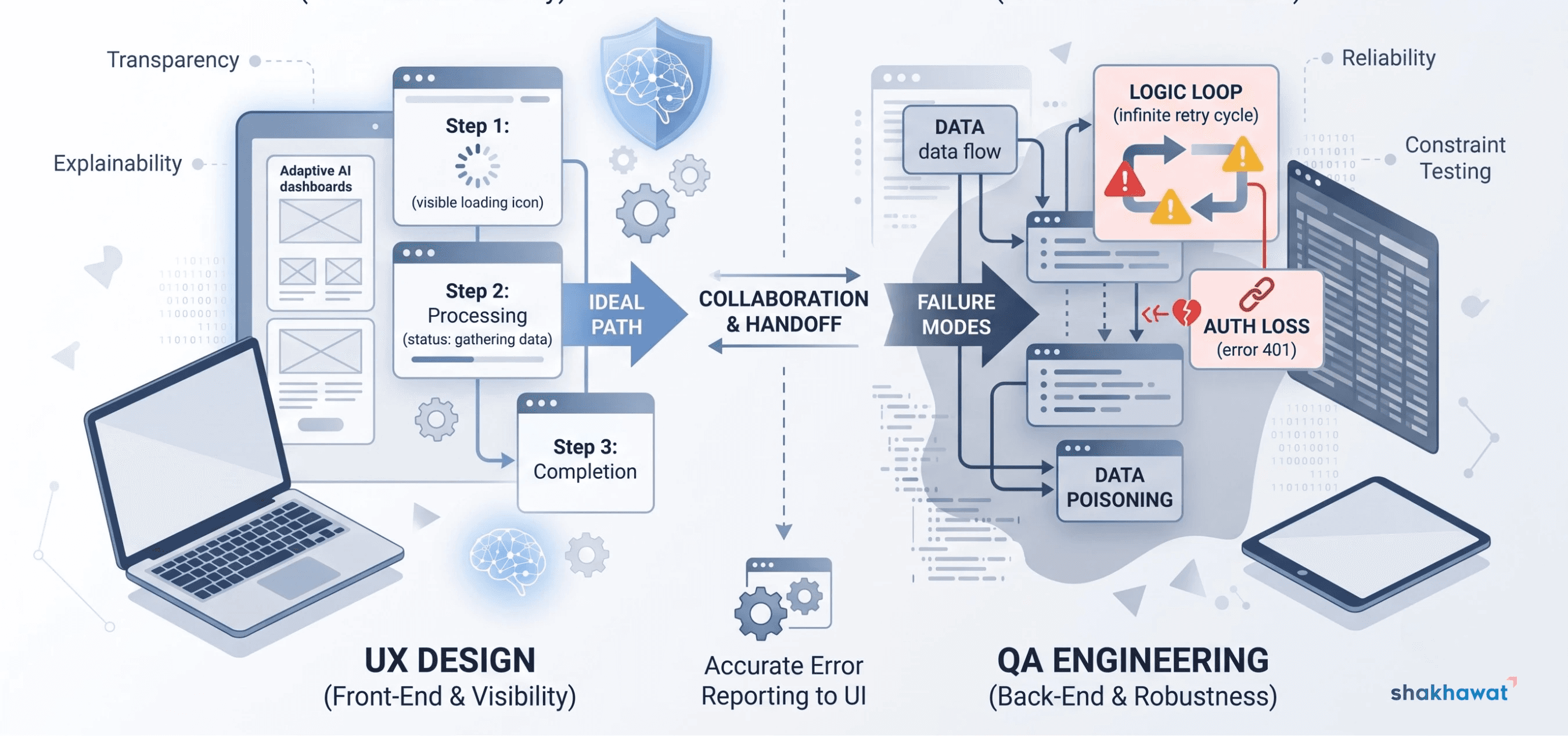
For UX designers, the challenge is mapping out these invisible states. Designers must create visual indicators that show the user the AI is "working" or "thinking" without causing alert fatigue. The interface needs to build confidence by explaining what the agent is doing at any given moment.
QA engineers approach this exact same process from the opposite direction. While UX maps the ideal path, QA hunts for the hidden failure modes. What happens if the AI agent gets stuck in a logic loop? What if it loses API authorization halfway through a transaction? QA must test these invisible backend breaks, and collaborate with UX to ensure the interface accurately reports those specific backend failures to the user, rather than just freezing.
2. Mastering Graceful Degradation
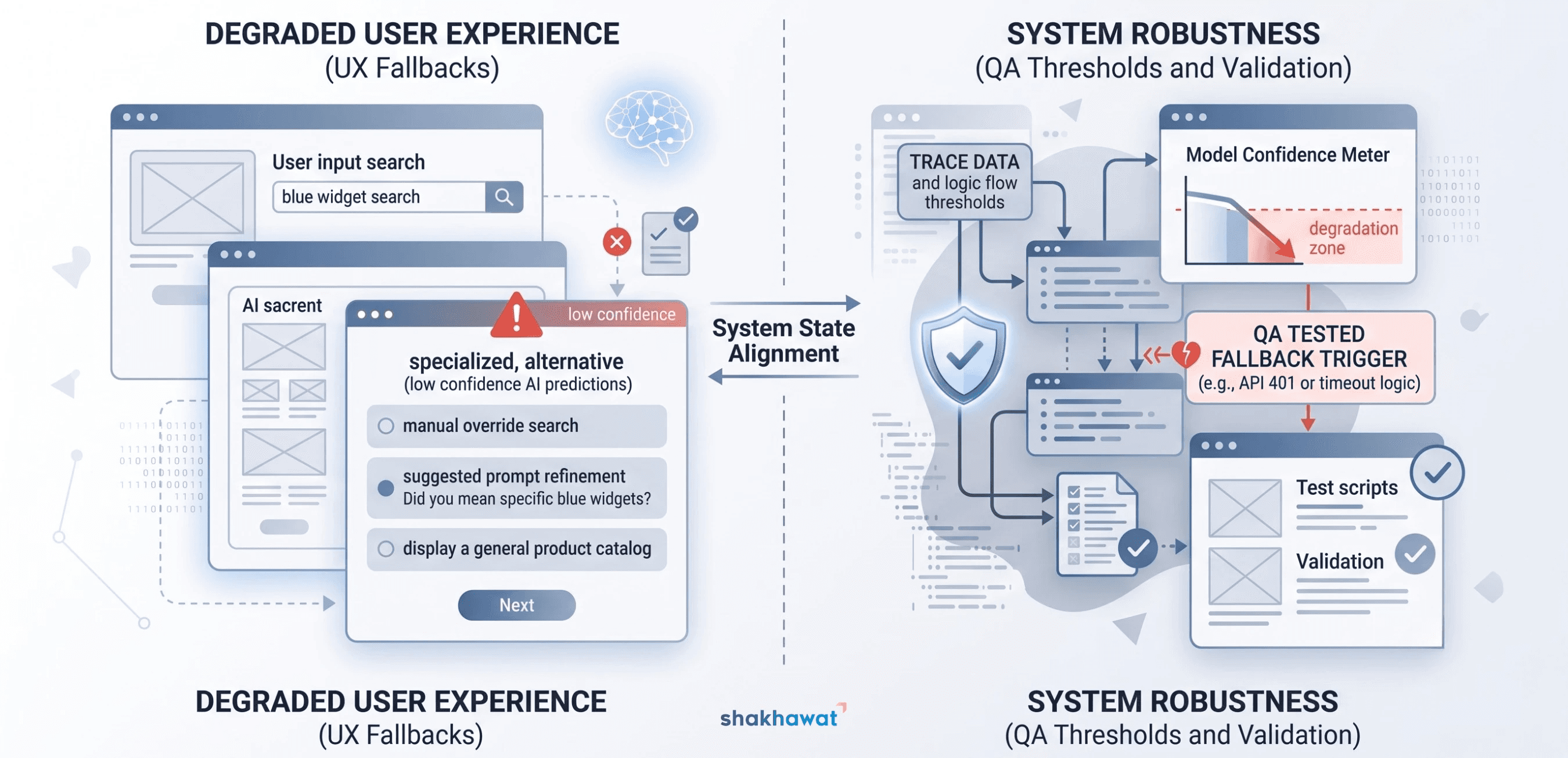
No matter how advanced an AI model is, it will eventually fail or return a low-confidence score. Graceful degradation dictates how the system handles that inevitable failure visually and functionally.
The UX Responsibility: Designers must create intuitive fallback states. If an AI cannot complete a task, the UI should not present a generic 404 error or a blank screen. The UX should smoothly guide the user to a manual override, suggest alternative prompts, or clearly explain why the data is unavailable.
The QA Responsibility: Functionally, QA must validate the thresholds that trigger these designs. QA engineers write automated tests that intentionally force low-confidence API responses or simulate data poisoning. They verify that the system safely defaults to the UX team's fallback design instead of crashing or hallucinating incorrect information.
3. Creating Continuous Feedback Loops
The launch of an AI product is just the beginning of its testing phase. Real users will always interact with artificial intelligence in unpredictable ways that no QA engineer or UX designer could foresee.
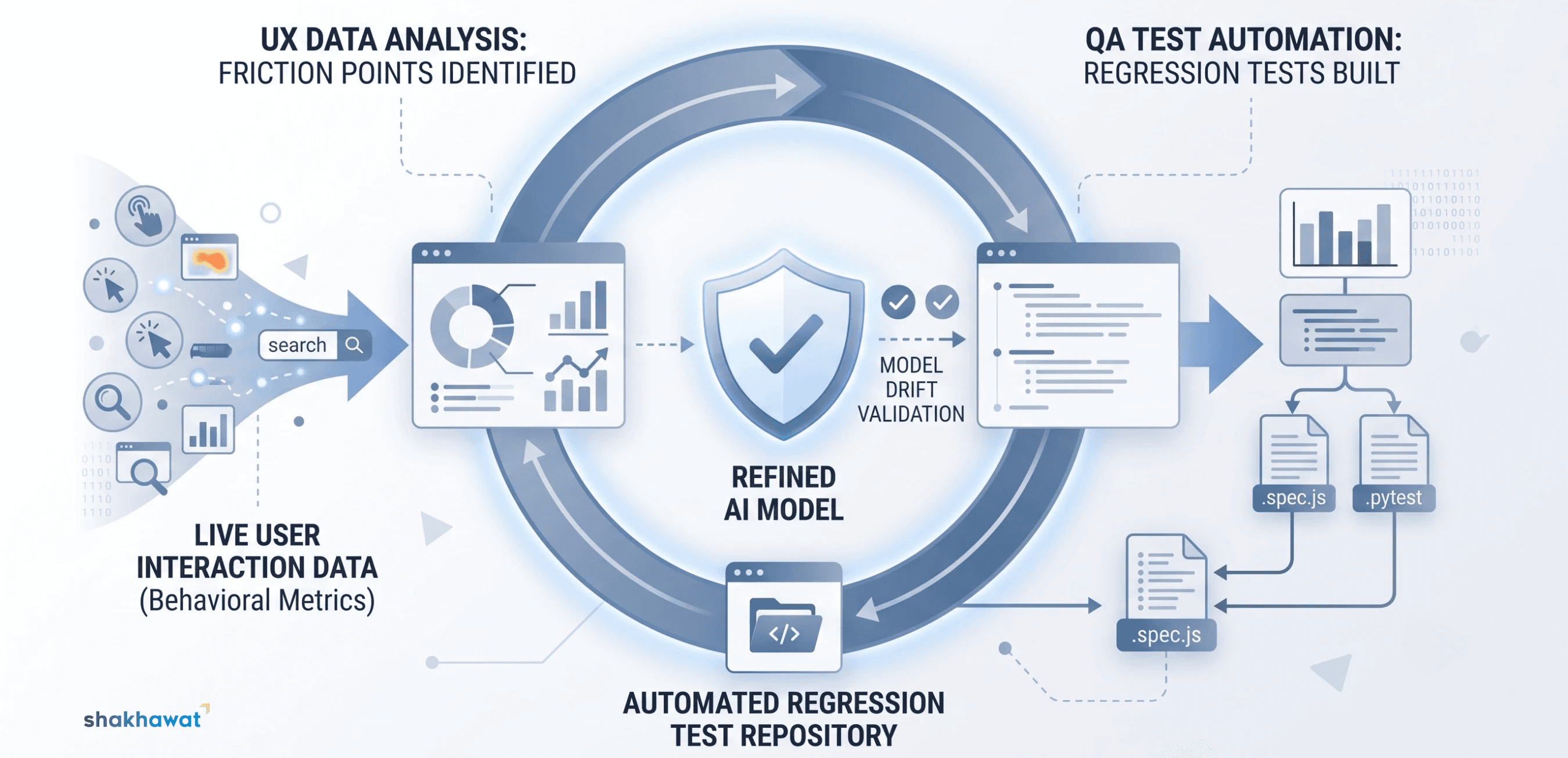
UX researchers track these live interactions to see where users experience friction, abandon a workflow, or reject an AI suggestion. This behavioral data is an absolute goldmine for the QA department.
Instead of guessing how to stress-test the system, QA can turn these real-world user interactions into automated regression tests. This creates a continuous, collaborative loop. UX identifies the human friction, and QA ensures the system logic handles that specific friction flawlessly in every future deployment.
Conclusion
Trustworthy AI is not a standalone feature you can simply code into a product at the last minute. It is the direct result of UX designers and QA engineers working together to ensure the system is just as reliable as it looks. When communication and stability are built together, user trust naturally follows.
References
Amershi, S., Weld, D., Vorvoreanu, M., Fourney, A., Nushi, B., Collisson, P., ... & Horvitz, E. (2019). Guidelines for Human-AI Interaction. Proceedings of the 2019 CHI Conference on Human Factors in Computing Systems, pages 1-13.
European Parliament and Council of the European Union. (2024). Artificial Intelligence Act. Article 50: Transparency Obligations for Providers and Deployers of Certain AI Systems.
Zhang, J. M., Harman, M., Ma, L., & Liu, Y. (2020). Machine learning testing: Survey, landscapes and horizons. IEEE Transactions on Software Engineering, Volume 48, Issue 1, pages 1-36.
Recommended Articles
A few more reads worth your time.
QA & Testing
The Modern QA Playbook: Testing Fast-Moving AI Codebases Without Burning Out
Discover how modern quality assurance engineers adapt to rapid continuous delivery. Learn practical strategies to prevent regressions, automate critical user flows, and maintain system reliability without burning out.

UX/UI Design
UX/UI Trends to Watch for in 2025
The digital world is evolving at an unprecedented pace, and with it, the field of UX/UI design is undergoing significant transformations. In 2025, web designers and developers will continue to push the boundaries of creativity and user experience. As we look ahead, several trends are emerging that promise to shape the way we design and interact with digital products. Here’s a look at the key UX/UI trends to watch for in 2025.

Web Design
The Power of Color Psychology in Web Design: Enhancing User Engagement
In today’s fast-paced digital world, web designers are constantly striving to create visually captivating and interactive websites that not only engage users but also drive conversions. One of the most influential elements in the design process is color psychology. This powerful tool can significantly affect user behavior, perception, and engagement, making it an essential consideration for any web design strategy.